


Introduction
Creating a website in 2026 is no longer a task reserved for seasoned developers with years of coding experience. The landscape of web design has been completely transformed by a new generation of powerful tools, many of which are now infused with artificial intelligence. Whether you are a solo entrepreneur, a creative professional, or a scaling enterprise, the right set of tools can mean the difference between a slow, frustrating launch and a stunning, high-performing online presence. This guide explores the best tools available today, helping you make informed decisions tailored to your specific needs, from cost and complexity to design goals and technical expertise.
Best Tools For Website Creation – Overview
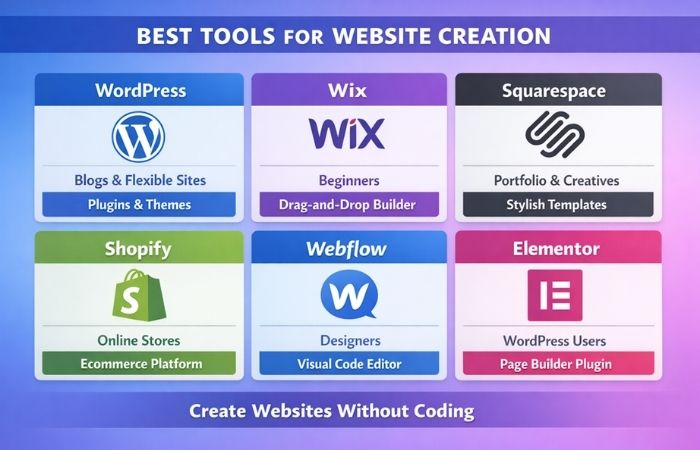
Selecting the right tool starts with understanding the landscape. Here is a comparison of some of the most popular and powerful website creation platforms available in 2026.
| Tool | Best For | Key Features | Pricing Model |
|---|---|---|---|
| Webflow | Designers & Agencies | Visual, no-code design with full control over CSS, HTML, and JavaScript; built-in CMS and hosting . | Starts at $14/month (billed annually) . |
| Wix | Beginners & Small Businesses | Intuitive drag-and-drop editor, 900+ templates, AI-powered design assistance (Wix ADI), all-in-one business tools . | Free plan available; premium plans start low. |
| Shopify | E-commerce & Content Brands | Seamless content-to-commerce integration, strong SEO, reliable hosting with global CDN, powerful for monetization . | Starting at $1/month for the first 3 months . |
| Squarespace | Creative Portfolios | Polished, design-forward templates; refined typography; all-in-one platform with built-in hosting and security . | Premium plans with various feature sets. |
| Framer | Interactive Prototypes | Code-powered web prototypes, intuitive design editor, extensive design tools for animations and interactions, free forever plan available . | Free plan available; paid plans start at $20/user/month . |
| WordPress.org | SEO & Content Publishers | Unmatched flexibility and control, vast plugin ecosystem, full ownership of content and data, powerful for large-scale content . | Free software (requires separate hosting). |
How to Choose the Right Tools for Building Your Website
With so many options, a structured approach to selection is essential. The table below outlines key considerations to guide your decision-making process.
| Consideration | Why It Matters | Questions to Ask Yourself |
|---|---|---|
| Technical Expertise | The tool’s learning curve should match your skill level to avoid frustration and wasted time . | Am I a complete beginner, or do I have design/coding experience? |
| Project Complexity | Simple sites need different tools than complex, data-driven platforms with custom logic . | Do I need a simple blog, a complex online store, or a membership site? |
| Budget & Resources | Costs vary from free to thousands of dollars; factor in both initial and long-term expenses . | What is my upfront budget? What are the ongoing costs (hosting, apps, maintenance)? |
| Design Control & Flexibility | Some tools offer template-based design, while others allow pixel-perfect customization . | How important is a unique, custom design versus launching quickly with a template? |
| Scalability & Future Growth | Your site should be able to grow with your business without requiring a complete rebuild . | Will this platform handle increased traffic, products, or features in 2-3 years? |
| SEO & Performance | Technical SEO and site speed are critical for visibility on search engines . | Does the tool allow deep SEO customization and offer fast, reliable hosting? |
Where to Find the Best Website Creation Tools?
Discovering the right tools involves exploring a mix of marketplaces, community recommendations, and expert reviews.
| Source | Description | Example |
|---|---|---|
| Official Marketplaces | The most reliable source for vetted themes, templates, and plugins specific to a platform . | Shopify App Store, Webflow Marketplace, WordPress.org Plugin Directory. |
| Software Review Sites | Aggregate user reviews, compare features, and provide unbiased ratings from real-world users . | G2, Capterra. |
| Design Blogs & Communities | Offer curated lists, in-depth tutorials, and insights on the latest trends and future-proof tools . | Codrops, Marker.io blog, Webflow University, design-focused Slack communities. |
Why Use Professional Tools for Website Building?

While basic tools exist, professional-grade platforms offer distinct advantages that contribute to a site’s long-term success .
- Credibility and Trust: A professionally designed website with a polished look and smooth functionality builds instant trust with visitors, which is crucial for converting them into customers.
- Scalability and Performance: Professional tools are built to handle growth. They offer robust hosting infrastructure, optimized code, and the ability to add complex features as your needs evolve .
- Strategic Advantage: Advanced SEO controls, conversion-focused design elements, and integration with marketing tools give you a significant edge over competitors using generic solutions .
- Ownership and Control: With platforms like WordPress.org, you have full ownership of your content and data, allowing you to migrate or modify your site without being locked into a single vendor’s ecosystem .
Top 10 Tools for Creating a Stunning Website
Here are ten top-tier tools that can help you build a visually impressive and highly functional website in 2026.
- Figma: The industry standard for collaborative UI/UX design, allowing teams to create, test, and refine website interfaces in real-time before a single line of code is written .
- Webflow: A powerful hybrid of a design tool and a CMS that lets designers build complex, responsive sites visually while producing clean, production-ready code .
- Shopify: The leading platform for e-commerce, combining robust commerce tools with excellent blogging and content capabilities, making it ideal for content-driven brands .
- Wix: A user-friendly powerhouse with an immense template library and AI tools that simplify the building process for beginners and small business owners .
- WordPress.org: The ultimate in flexibility and control, powering a huge percentage of the web. Its vast plugin ecosystem means you can build almost anything .
- Canva: A go-to tool for creating stunning visual assets—social media graphics, blog images, and even basic web graphics—without any design experience .
- Framer: A tool for designers who want to build highly interactive, code-powered prototypes and websites with a smooth, intuitive interface .
- Blocksy: A fast and flexible WordPress theme that prioritizes performance and offers deep customization, making it a favorite among designers .
- Uncode: A best-selling, multi-purpose WordPress theme known for its wealth of design options, wireframes, and advanced page builder, perfect for high-end creative projects .
- GemPages: A powerful page builder for Shopify that extends design flexibility, allowing merchants to create unique, high-converting landing pages and blog layouts .
Best Free Tools for Building a Website
You don’t need a big budget to get started. Several excellent tools offer robust free plans perfect for learning, prototyping, or launching simple sites.
| Tool | G2 Rating | Free Plan Highlights | Best Use Case |
|---|---|---|---|
| Figma | 4.5/5 | Real-time collaboration, vector editing, prototyping for unlimited users and files . | Collaborative interface design and prototyping. |
| Framer | 4.5/5 | Free forever plan includes a code editor, design canvas, and custom fonts . | Interactive, code-infused web prototypes. |
| Canva | 4.7/5 | Drag-and-drop interface, extensive library of free templates, photos, and icons . | Creating quick, professional-looking web graphics. |
| Wix | 4.1/5 | Free plan with access to templates and drag-and-drop editor (includes Wix ads) . | Launching a simple personal site or testing the platform. |
| Readymag | 4.2/5 | Free for one website with up to 10 pages, offering creative, magazine-style layouts . | Building a unique, visually-driven portfolio or editorial project. |
Best Website Builder for Beginners
For those with no prior experience, ease of use is the most critical factor. These platforms are designed to get you online quickly and painlessly.
- Wix: Remains the gold standard for beginners. Its drag-and-drop editor is incredibly intuitive, and the vast template library provides a great starting point for any type of site. The Wix ADI (Artificial Design Intelligence) can even build a personalized site for you based on a few simple questions .
- Squarespace: If you prioritize beautiful design above all else, Squarespace is an excellent choice. Its templates are consistently stylish and modern, and the platform handles all the technical details, allowing you to focus on your content .
- Canva: For absolute beginners who need to create simple, one-page sites or landing pages, Canva’s familiar interface is the most accessible option, though it lacks the depth of a full website builder .
Website Creation Cost Worldwide
The cost of building a website varies dramatically depending on your needs, location, and whether you use a builder or a professional designer. For example, custom Shopify design costs can range from a few hundred to tens of thousands of dollars based on the project’s scope .
| Region | Basic Package (e.g., Theme Setup) | Standard Package (e.g., Custom Sections) | Premium / Custom Build |
|---|---|---|---|
| USA / Canada | $1,000–$2,500 | $3,000–$8,000 | $8,000–$25,000+ |
| UK / Germany / France | £800–£1,800 / €900–€2,100 | £2,500–£6,000 / €3,000–€7,000 | £6,000–£18,000 / €7,000–€22,000+ |
| India | ₹60,000–₹1,50,000 | ₹1,50,000–₹4,00,000 | ₹4,00,000–₹12,00,000+ |
| Australia / New Zealand | AUD 1,800–3,500 | AUD 4,000–12,000 | AUD 12,000–30,000+ |
| UAE / GCC | $1,200–$3,000 | $4,000–$10,000 | $10,000–$30,000+ |
Note: These are estimated costs for professional Shopify design, as an example. Using a DIY builder like Wix or Squarespace will have significantly lower upfront costs, typically a monthly subscription fee .
Best AI for Website Creation
Artificial intelligence is now a core component of many website builders, automating tasks from design to content generation.
- Wix ADI (Artificial Design Intelligence): Excels at creating a complete, personalized website in minutes. It asks you questions about your goals and preferences, then intelligently generates a site with relevant text and images .
- Mobirise AI: An AI-powered no-code builder that can generate a solid website foundation from a single text prompt. It’s a fast way to create a site from a screenshot, mockup, or simple description .
- CSAI (for WordPress): A powerful AI tool integrated with the Cornerstone builder, it allows users to generate chat, copy, code, and images directly within the WordPress environment, supporting various AI models .
- Figma AI: Figma has integrated AI features to automate manual tasks like renaming layers or generating design elements, speeding up the design workflow .
Conclusion
The world of website creation in 2026 is more accessible and powerful than ever before. Whether you choose the intuitive, AI-driven path of a platform like Wix, the design-centric control of Webflow, or the boundless flexibility of WordPress.org, the key is to align your choice with your specific skills, goals, and budget. By leveraging the right tools, you can build not just a website, but a true digital asset that effectively represents your brand and achieves your objectives.
FAQs
1. What is the easiest website builder for a complete beginner?
Wix is widely considered the easiest due to its purely drag-and-drop interface and the optional Wix ADI, which builds a site for you automatically .
2. How much does it cost to build a website in 2026?
Costs vary widely. Using a DIY builder, you can start for as low as $5–$15 per month. Hiring a professional for a custom business site can range from $3,000 to over $25,000, depending on complexity and region .
3. Can AI really build a good website for me?
AI tools are excellent for generating a solid, professional-looking foundation quickly. However, they often create generic designs. For a truly unique, on-brand site that requires strategic thinking and emotional intelligence, human input is still essential .
4. What’s better for blogging: Wix or WordPress?
For serious, long-term blogging where SEO and scalability are top priorities, WordPress.org is superior due to its advanced content architecture and plugin ecosystem. For a simpler, visual blog, Wix is a great, easy-to-use option .
5. What is the difference between Webflow and Wix?
Wix prioritizes ease of use and speed, making it ideal for beginners. Webflow prioritizes design precision and control, offering a steeper learning curve but greater flexibility for professional designers .
6. Are free website builders any good?
Yes, many offer robust features. Figma and Framer have powerful free plans for design and prototyping, while Wix and Canva allow you to build and publish simple sites at no cost .
7. What is the best tool for designing an online store?
Shopify is the leading platform specifically built for e-commerce. It offers unmatched sales features, reliable performance, and flexibility for scaling from a small shop to a large enterprise .
8. Can I switch website builders later without starting over?
Migrating from one builder to another (e.g., Wix to WordPress) is possible but often complex and manual. Content like blog posts can be exported, but designs and layouts usually need to be rebuilt from scratch. It’s best to choose a scalable platform from the start .
